Place Connectors
 Updated 6 days ago
by
Kerry Poe
Updated 6 days ago
by
Kerry Poe

Summary
The Place Connectors feature gives you the ability to easily place connector fittings on open conduit ends.
- eVolve tab ⮞ Conduit Bends panel ⮞ Place Connectors button


Usage
Place Connectors
- Pre-requisite: The project must already have conduit connectors loaded in.
- EVOLVE conduit connector families can be found within the Conduit Fitting category of the Content Browser.
- Non-EVOLVE conduit connector families can be used with the following requirements:
- The parameter eVolve_Feature must exist.
- The parameter eVolve_Feature must equal Conduit Connector.
- From the eVolve ribbon, in the Conduit Bends panel, click Place Connectors.
- From the drawing area, click any conduit or conduit fitting with an open end that you'd like to place a connector on.
TIP: A plus will appear beside the pointer denoting that the element may be added to the selection. Once selected, when hovering over the same element, a minus symbol appears indicating the element may be removed from the selection. - After the desired elements have been selected, from the Options Bar, click Finish.
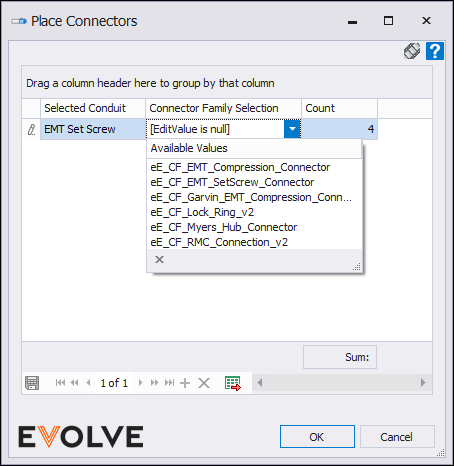
- From Place Connectors popup window, use the Connector Family Selection dropdown to choose the desired connector family.
- Selected Conduit column - displays the conduit types of the selected conduit elements.
- Connector Family Selection dropdown - designates which available connector family to be placed.
- Count column - displays the quantity of eligible conduit elements selected.
- After the desired connector family per conduit type has been selected, click OK.

