Prefabrication Settings


Summary
The Prefabrication Settings area allows users to define when and how various options and statuses are applied to spools.
- eVolve tab ⮞ Prefabrication panel dropdown ⮞ Prefabrication Settings button


Window Overview
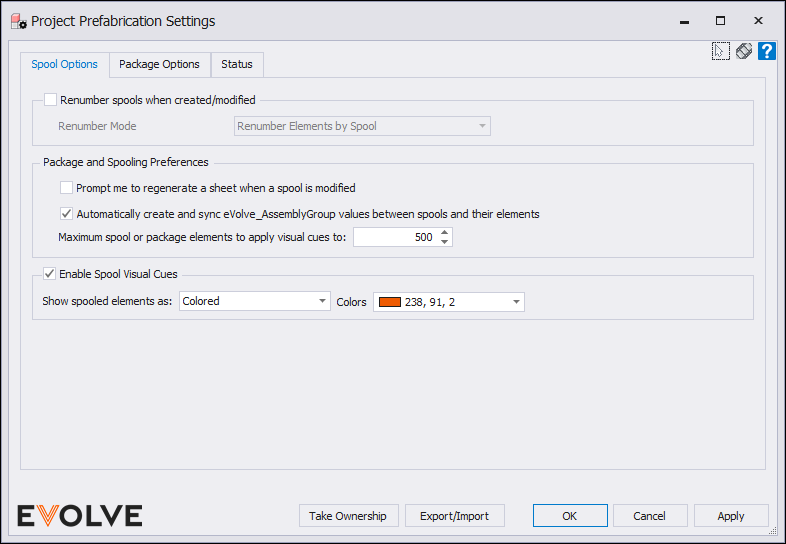
Spool Options Tab
- Renumber spools when created/modified checkbox panel - When enabled, this option will use your current renumbering settings to renumber the spooled components when created or modified.
- Renumber Mode menu
- Last used Renumber Settings - Uses the last radio selection in the Renumber panel on Renumber Settings window as the renumber mode.
- Renumber Elements - Runs the rule set against each element in the selection, numbering in no particular order.
- Renumber Elements by Spool - Runs the rule set against each spool in the selection, resetting the starting value with each spool.
- Renumber Mode menu
- Package and Spooling Preferences panel
- Prompt me to regenerate a sheet when a spool is modified checkbox - When enabled, disables the functionality that rebuilds sheets when a spool assembly is modified.
- Automatically create and sync eVolve_AssemblyGroup values between spools and their elements checkbox - When enabled, the eVolve_AssemblyGroup parameter is automatically assigned to each spool and its member elements, including when those elements are added to or removed from spools.
- Maximum spool or package elements to apply visual cues to input box - The maximum number of combined elements for which visual cues will be applied during spool and package modification commands. Visual cues are skipped and a warning is shown when this limit is exceeded to avoid performance issues. Set to 0 to disable the limit.
- Spool Visual Cues panel
- Enable Spool Visual Cues checkbox - Determines if elements belonging to a spool are visually distinguished in the active view when using one of the spool modification commands.
- Show spooled elements as dropdown - Controls how elements belonging to a spool are visually distinguished in the active view when using one of the spool modification commands.
- Colors dropdown - The color applied to spooled elements when the visual cue type is set to Colored.
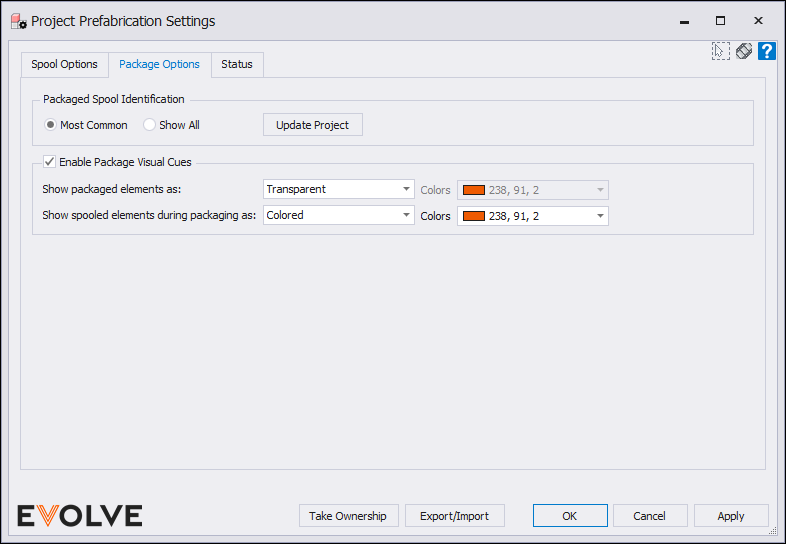
Package Options Tab
- Packaged Spool Identification panel
- Most Common radio button - When a spool contains elements from multiple packages, the most common package Id will be used.
- Show All radio button - When a spool contains elements from multiple packages, all package Id's are comma separated.
- Update Project button - Refreshes the package Id's of spools containing elements from multiple packages according to the radio button selection.
- Package Visual Cues panel
- Enable Package Visual Cues checkbox - Determines if elements belonging to a package are visually distinguished in the active view when using one of the package modification commands.
- Show packed elements as dropdown - Controls how elements belonging to a package are visually distinguished in the active view when using one of the package modification commands.
- Colors dropdown - The color applied to package elements during a package modification command when the visual cue type is set to Colored.
- Show spooled elements during packaging as dropdown - Controls how elements belonging to a spool are visually distinguished in the active view when using one of the package modification commands.
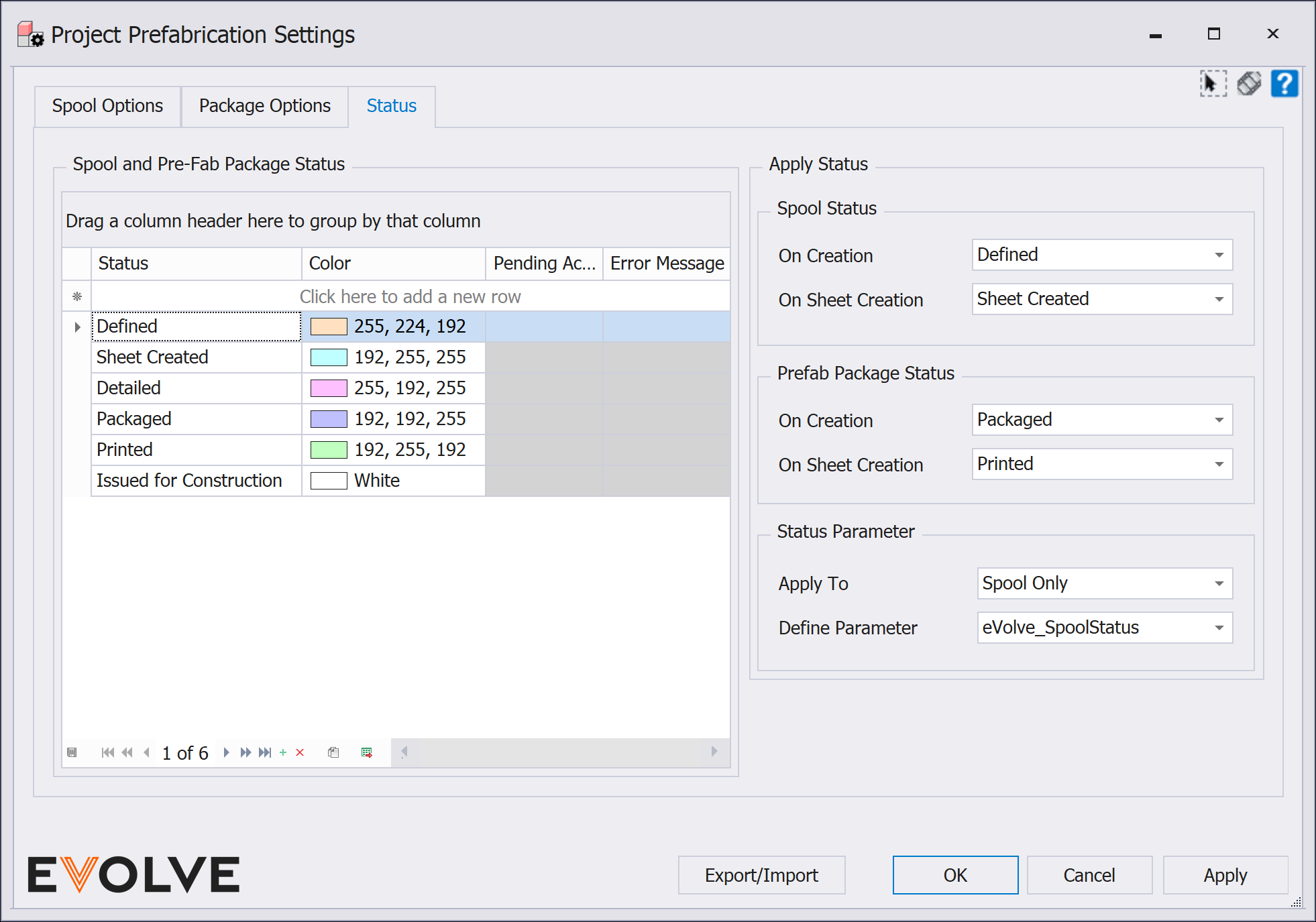
Status Tab
- Spool and Pre-Fab Package Status panel
- The Spool and Prefab Package Status grid allows users to add and define any status when a sheet is created. Simply enter a status parameter and select the color to apply that will be visible in the Prefab Manager.
- Apply Status panel
- Spool Status subpanel
- On Creation dropdown - applies the selected status when a spool is defined.
- On Sheet Creation dropdown - applies the selected status when a spool is generated.
- Pre-Fab Package Status subpanel
- On Creation dropdown - applies the selected status when a package is defined.
- On Sheet Creation dropdown - applies the selected status when a package is generated.
- Spool Status subpanel
- Status Parameter subpanel
- Apply To dropdown - allows user to define which elements the status should be written to.
- Spool and all elements dropdown - the spool's current status is applied to the assembly(spool) element and all elements contained within the spool.
- Spool only dropdown - the spool's current status is applied only to the assembly(spool) element.
- Define Parameter dropdown - allows user to define which parameter the status should be written to.
- Apply To dropdown - allows user to define which elements the status should be written to.
Note: default value will equal eVolve_SpoolStatus

